Table of Contents
Quick Overview
Here is the quick summary construction contract management tools:
- Modern contract management platforms centralize contracts, change orders, and live cost data in one system.
- Key evaluation criteria: construction focus, workflow automation, real-time dashboards, ERP integrations, ease of use, and ROI.
- Enterprise tools like InEight Contract and Oracle Primavera Unifier suit large capital and public projects.
- Mid-size GCs often prefer Procore, Autodesk Build, or RedTeam for field-friendly cost control.
- Large contractors seeking all-in-one ERP solutions consider CMiC or Trimble Viewpoint Vista.
- Residential builders benefit from client-focused tools like Buildertrend.
- Choosing the right tool depends on project size, company culture, integrations, budget, and pilot testing.
- Real-time visibility turns change orders from profit risks into manageable, predictable outcomes.
Margins in construction average just 4 percent, so one pricey change order can erase a year of profit. Yet 85 percent of projects exceed their original estimates, and megaprojects can soar 80 percent beyond budget, according to Leaderonomics. The root cause? A 2026 Anchor Group survey found that 82 percent of contractors still juggle critical costs in spreadsheets.
Purpose-built contract-management platforms close that visibility gap. They combine contracts, change orders and live actuals in one ledger, so when a superintendent flags a potential change the budget updates instantly and finance sees the ripple effect before it hits the books.
Below, we compare eight leading construction contract management tools; from enterprise suites to nimble cloud apps; to help you choose the one that keeps surprises off your cost report and profit in your pocket.
Why Change-Order Cost Visibility Matters?
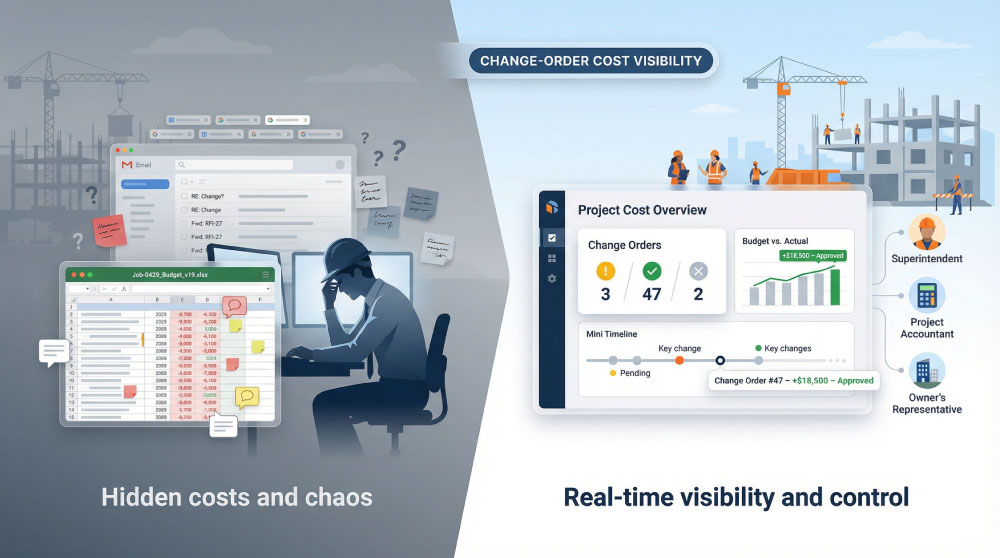
A client adjusts the facade, a supplier swaps materials, a crew uncovers unexpected soil. Each tweak becomes a change order, and every change order adds dollars and days you did not plan to spend.
When those dollars hide in email threads and version-19 spreadsheets, costs creep quietly. By the time a project manager notices the red ink, concrete is poured, and accounting has cut the check. Reversing course is impossible, and profit slips away.
Real-time visibility flips that script. The moment a potential change is logged, everyone, including the superintendent, the project accountant, and the owner’s rep, sees the exact impact on budget and schedule. We stop guessing and start steering.
Visibility also keeps relationships healthy. Disputes fade when the system records who approved what, and when. Owners trust the numbers, subcontractors trust the process, and the team spends less time arguing and more time building.
Finally, always-current data fuels smarter forecasting. Because every approved or pending change rolls instantly into cost projections, we can spot an overrun months before it hits. That early warning is the difference between a managed adjustment and a headline-grabbing loss.
Change orders are inevitable; surprise overruns are not. Give the team a live window into each change, and you protect margin, schedule, and trust in one move.
How We Measured “Best”: the Evaluation Benchmarks
Before comparing software, we defined best. We asked a simple question: Which features move change-order cost control the most? The answer became a six-point scorecard weighted by the time saved, errors avoided, and margin preserved.
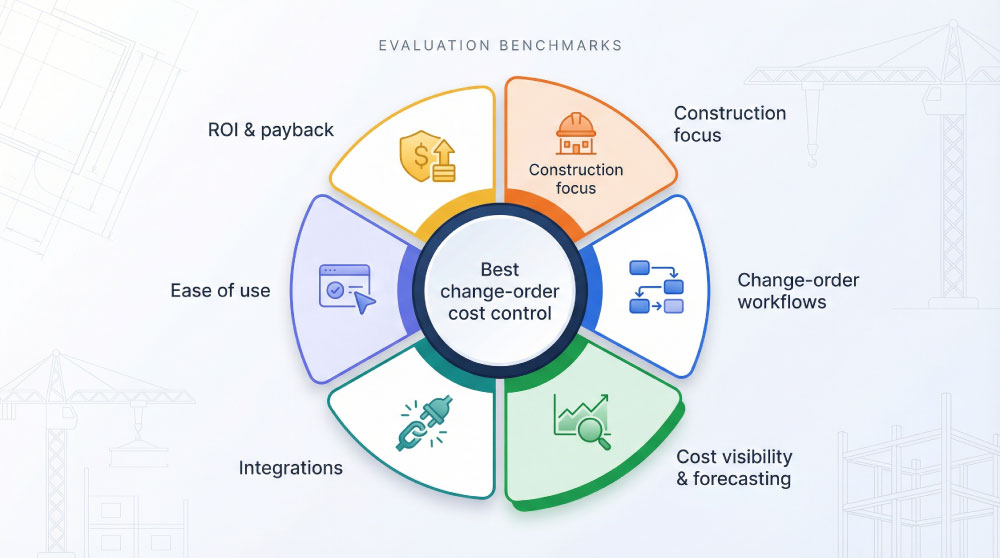
First, construction focus topped the list. Generic contract tools miss granular cost codes, unit prices, and lien waivers. If a platform started life outside construction, it had to prove deep industry adaptation to stay in the running.
Next, we examined change-order workflows. Native forms, approval routing, automatic budget updates, and a clean audit trail were must-haves. If a superintendent could not start a change on her phone or finance could not see the impact within five minutes, the tool lost points.
Cost visibility and forecasting carried heavy weight. Real-time dashboards, earned-value calculations, and variance alerts separate true control systems from digital filing cabinets. We rewarded platforms that surface overruns early instead of recording history after the fact.
InEight Project Controls automatically calculates earned value from live field data, giving teams an objective view of percent complete and eliminating the bias that plagues spreadsheet-based reporting.
That automated EVM feed is exactly the kind of always-current insight our scorecard rewards.
Integrations mattered because double entry drains productivity and invites risk. A tool had to link with common ERPs and accounting software such as SAP, Oracle, Sage, or QuickBooks so project data and financial books stay aligned.
Ease of use came next. Field teams have no time for steep learning curves, so we checked user reviews, mobile-app ratings, and interface walkthroughs. If everyday users praised speed and clarity, the score climbed.
Finally, we balanced sticker price against return. Subscription fees, implementation effort, and add-on modules formed the cost side. Documented cuts in admin hours, faster change-order turnaround, and fewer disputes formed the benefit side. Platforms that delivered quick payback rose to the top.
With this six-part rubric in place, we can compare apples to apples in the sections ahead and focus on what matters most: keeping change-order costs visible and under control.
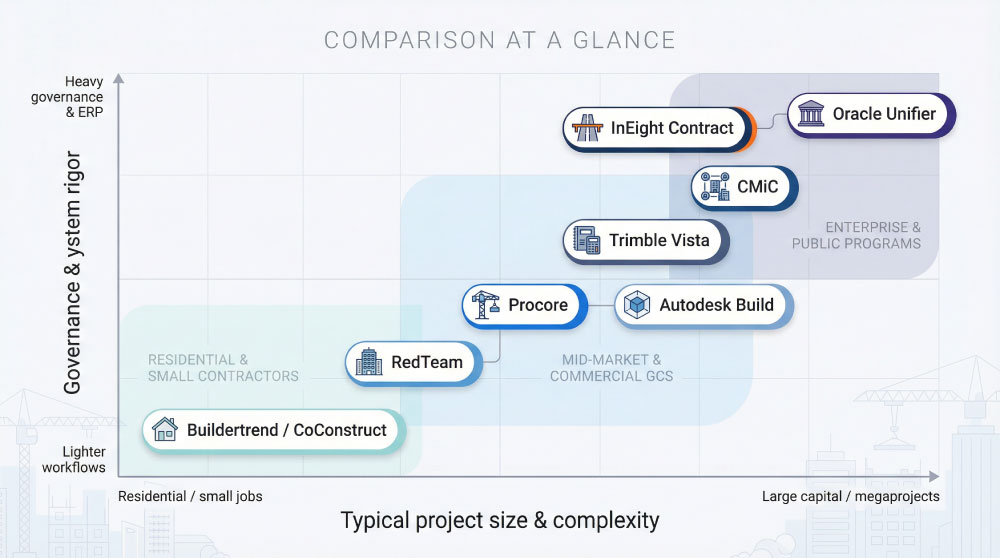
Comparison at a Glance
You now know how we scored each platform. Before we explore them in detail, here is the quick scorecard readers ask for first. Scan the grid, note the tools that cover your must-haves, and keep reading for deeper insight.
| Platform | Live Cost Dashboard | Change-Order Workflow | ERP / Accounting Integrations | User Rating* | Best Fit |
| InEight Contract | Earned-value view | Multi-tier approvals | SAP, Oracle, JD Edwards | No public rating | Capital projects above $100 million |
| Procore | Field-driven updates | One-tap mobile approvals | Sage 300, Viewpoint, QuickBooks | 4.6 / 5 | Mid-size to ENR 100 general contractors |
| Autodesk Build | BIM-linked budgets | Design-change triggers | NetSuite, QuickBooks, CMiC | 4.4 / 5 | Design-build and BIM teams |
| Oracle Unifier | Cash-flow lens | Highly configurable | Oracle, SAP, Primavera P6 | 4.0 / 5 (approx.) | Public owners and program management offices |
| Trimble Vista | Native job costing | Standard, GL-tied | Built-in ERP | 2.8 / 5 (mobile) | Contractors above $50 million revenue |
| RedTeam | Budget versus actual | Built-in change logs | QuickBooks | 4.3 / 5 | Mid-market general contractors |
| CMiC | Unified ERP data | Configurable flows | Native ERP suite | 3.3 / 5 | Large GCs seeking one system |
| Buildertrend / CoConstruct | Simple dashboards | Client e-sign approvals | QuickBooks, Xero | 4.5 / 5 | Residential builders and remodelers |
*User ratings come from G2 and Capterra snapshots collected in January 2026.
With the landscape mapped, we next look at each platform, beginning on the enterprise end of the spectrum.
1. InEight Contract: Enterprise Control for Capital Projects
Picture an interstate-widening job worth half a billion dollars. Scores of primes, hundreds of subs, thousands of cost codes. One unexpected bridge-deck rebar change, and the budget veers off course. That is the arena InEight Contract solves.
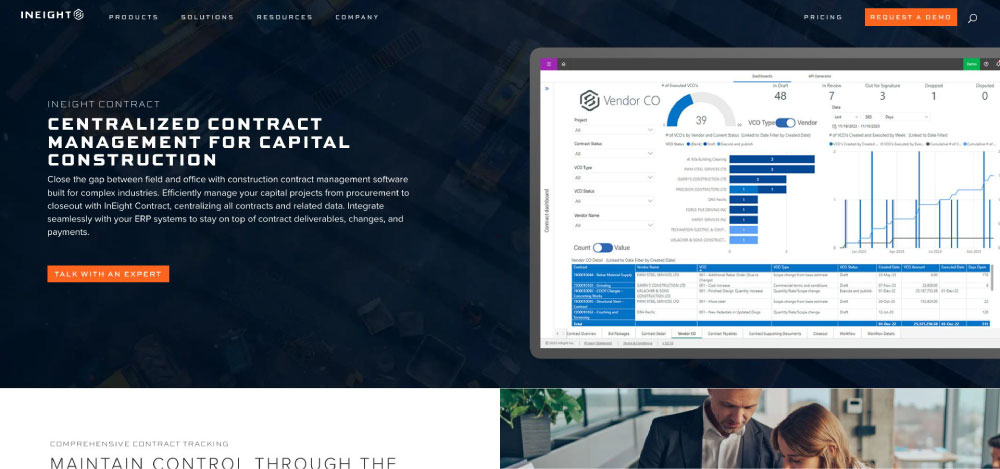
The platform is purpose-built contract management software that centralizes every contract, change order and payment detail in a cloud ledger that also syncs with your ERP, so both field and finance share the same real-time view of cost impact.
The platform pulls every prime contract, subcontract, and change event into a single ledger. When a field engineer logs a potential change, the earned-value engine recalculates the forecast within seconds. Project managers see variance at once, executives view it on their dashboards, and owners get a clean audit trail that proves nothing slipped through the cracks.
Governance runs deep. Multi-tier approval rules, granular security, and date-stamped histories satisfy even the strictest public-sector auditors. Integrations with SAP, Oracle, and JD Edwards move pay applications straight into corporate financials without a single CSV in sight.
InEight is not a quick plug-and-play app. Teams invest time up front to map cost codes and train users, but the payoff appears in avoided claims and accurate forecasts on nine-figure jobs. If you manage capital programs where one mismanaged change order can reach the Senate floor, InEight provides the control room you need.
2. Procore: Field-Friendly Budget Control
Walk any active jobsite and you will see phones lit by Procore’s orange icon. The app earned that reach by turning cost control into part of daily field work.
When a superintendent snaps a photo of unforeseen rock excavation and submits a potential change from her phone, Project Financials updates the budget at that moment. Pending, approved, and rejected changes stack up visibly, so the team never waits for a weekly spreadsheet to know the score.
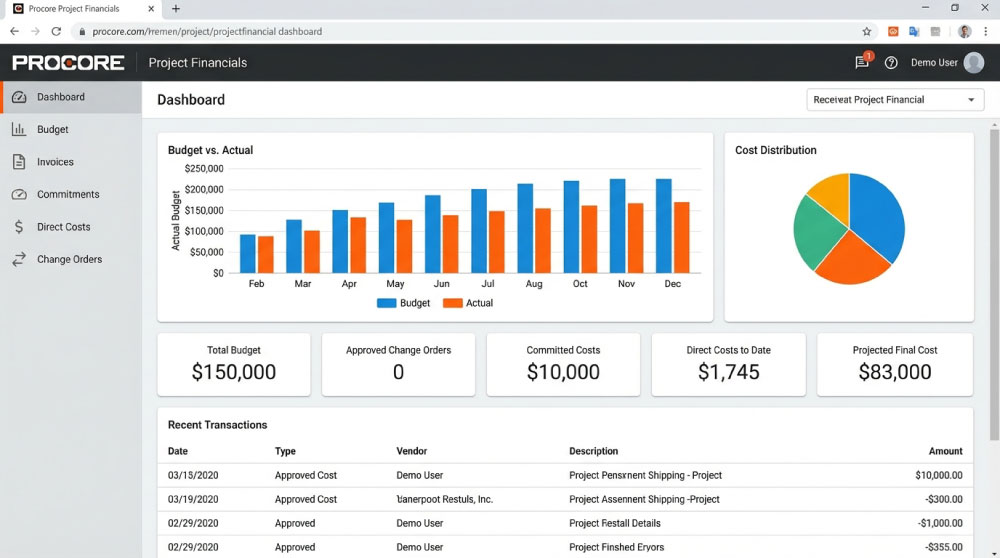
Usability drives adoption. The mobile app scores 4.6 out of 5 from more than 4,000 reviewers on G2 Crowd, a rare mark for construction software. That ease shortens training and keeps data flowing from the field rather than sitting in notebooks.
On the back end, Procore pushes approved commitments straight into Sage 300, Viewpoint Vista, or QuickBooks. Finance receives accurate job-cost data without re-keying, and project managers trust the numbers because they entered them themselves.
Subscription pricing lands in the middle of the pack, yet it unites drawings, RFIs, submittals, photos, and costs in one cloud hub. For general contractors juggling dozens of commercial projects, that single view pays back quickly through fewer email chases and tighter monthly cost reports.
3. Autodesk Build: Linking Design Intent to Dollars
Autodesk Build sits where blueprints meet budgets. Because it shares DNA with Revit and AutoCAD, design changes move straight from model to money.
If an architect shifts a shear wall two feet, Build flags the affected cost items, spins up a potential change order, and shows the delta on the Cost Control dashboard before the ink dries. Design-build teams appreciate this live link because it removes the old “draw first, cost later” delay.
The platform also keeps everyone on the same drawing set. When a change order is approved, revised sheets publish instantly to field tablets, trimming rework and finger-pointing.
Integrations finish the picture. Build syncs budgets to NetSuite, QuickBooks, and CMiC, allowing firms that run an ERP back office to keep project and financial data aligned. For contractors rooted in Autodesk’s design ecosystem, this tool closes the loop between intent and impact.
4. Oracle Primavera Unifier: Governance Above All
Some projects move at handshake speed. Others answer to legislators, bondholders, and diverse funding streams. Unifier serves the second group.
Every dollar, document, and decision pass through a configurable workflow that leaves a digital record. Need two approvals for any change above $50,000? Set the rule once, and Unifier enforces it. Need to show auditors the exact chain of custody for a disputed change? Pull the log, and the proof appears in seconds.
Because Unifier sits inside Oracle’s ecosystem, it speaks directly to Oracle ERP, Primavera P6 scheduling, and Textura payment management. Budget shifts triggered by schedule delays surface automatically in cash-flow forecasts, letting program managers act before a quarterly review exposes the problem.
Yes, the interface feels heavier than newer SaaS tools, and implementation demands careful planning. But for public agencies and megaproject PMOs that prize compliance over convenience, Unifier delivers control no spreadsheet or lightweight app can match.
5. Trimble Viewpoint Vista: Accounting Roots, Project Smarts
Vista began in the accounting department, and you feel it in every screen. Job-cost ledgers, GL entries, and payroll live under one roof, so numbers match to the penny without file exports or late-night lookups.
That back-office strength flows into change management. When a project engineer converts a potential change into an approved order, Vista bumps the project budget, writes the journal entry, and updates forecast cost to complete in real time. Controllers value the accuracy, and project managers appreciate the instant clarity.
The trade-off is user experience. Field crews often grumble about the desktop-era interface, and the mobile app trails slicker rivals. Many contractors pair Vista with Procore, or other field tools, to smooth the edges, but teams that live in Vista rely on its financial precision.
If your CFO insists on a single source of truth and your projects justify a full ERP, Vista provides firm cost control coupled with rigorous accounting.
6. RedTeam: Real-Time Financials for Mid-Size Contractors
RedTeam targets builders who have outgrown spreadsheets but do not need a full ERP. Its standout benefit is speed from estimate to baseline budget to live cost tracking.
Import an estimate, select once, and the system creates a starting budget. As change orders arrive, RedTeam refreshes the job-cost dashboard instantly, flagging variances in red, yellow, or green that any project manager can read at a glance.
Because many mid-market GCs run QuickBooks, RedTeam sends invoices, commitments, and payments directly to the ledger, sparing back-office teams from double entry. The mobile app is straightforward, so superintendents approve changes on site instead of waiting for office hours.
Pricing lands below enterprise rivals, and implementation wraps in weeks, not months. For contractors in the $10 million to $100 million range who want professional-grade cost control without enterprise weight, RedTeam fits the bill.
7. CMiC: All-In-One Muscle for Large Contractors
CMiC lives the single-source-of-truth promise. Financials, HR, equipment, drawings, subcontracts, and change orders sit inside one relational database. Approve a change on Tuesday, and it appears automatically in payroll, billing, and project forecasts on Wednesday without middleware.
Depth brings complexity. New users meet form-heavy screens and terminology rooted in enterprise resource planning. Firms that succeed with CMiC invest in onboarding and often appoint internal power users to guide adoption.
Once configured, the payoff is control at scale. ENR Top 100 contractors run billions through CMiC because it handles multi-company joint ventures, detailed intercompany eliminations, and real-time consolidation. For builders ready to retire a patchwork of niche apps and replace them with one enterprise platform, CMiC offers the framework to do so.
8. Buildertrend and CoConstruct: Client-Friendly Control for Home Builders
Residential work rises or falls on homeowner changes. Granite instead of quartz, wider windows, an extra deck light, each tweak must be priced, approved, and tracked or profit disappears. Buildertrend, now merged with CoConstruct, centers on that exact workflow.
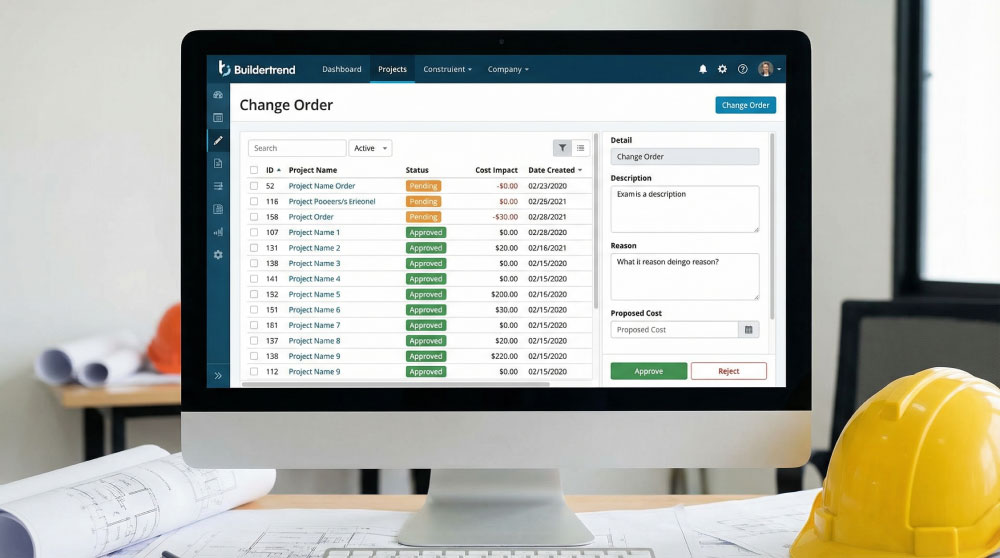
Whether on site or on the sofa, a builder creates a change order, sets the new price, and sends it to the client portal. Homeowners tap “Approve” on their phone, and the budget refreshes instantly. No paper slips, no unsigned emails to dispute at closing.
Dashboards stay simple on purpose. You see the original contract, approved changes, and remaining allowance in language clients also understand. That shared view trims awkward cost-overrun talks and keeps everyone confident in the numbers.
The platform syncs with QuickBooks and Xero, so invoices and receipts post automatically. Unlimited users let you loop in designers, trade partners, and lenders without added fees.
Buildertrend charges a predictable monthly rate and onboards most teams in a few days. If you build custom homes, remodel kitchens, or run specialty trades, it provides professional change-order control without the weight of an enterprise system.
How to Choose the Right Tool for Your Business?
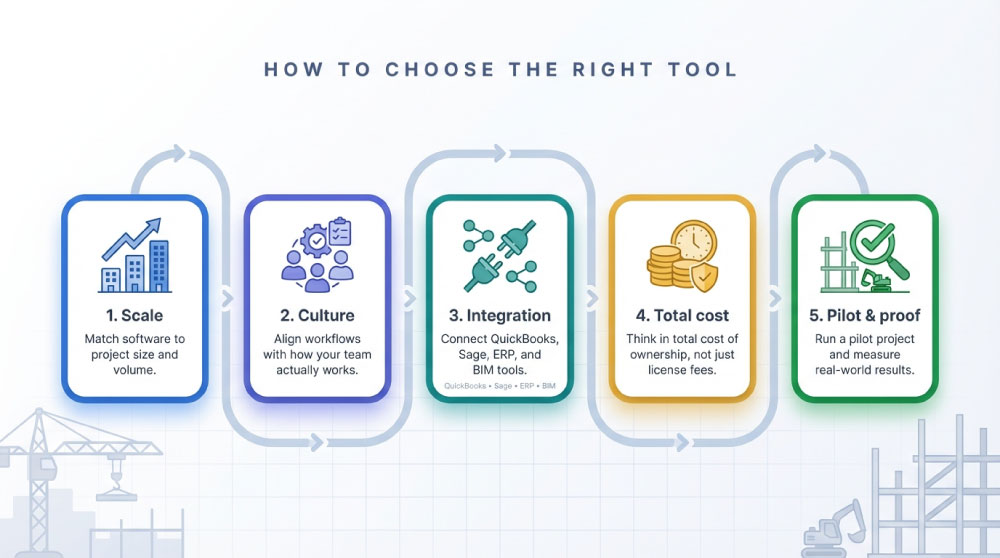
Start with honest numbers. A five-person remodelling crew rarely needs the audit horsepower of Oracle Unifier, and a public works authority cannot rely on an app built for kitchen makeovers. List your average project size, annual volume, and the number of people who will use the system each day. These answers narrow the field quickly.
Next, match software culture to company culture. If your team thrives on defined processes and checklists, a platform that enforces approval gates will feel like a safety net. If you win work by pivoting fast in the field, a mobile-first tool that lets superintendents log changes in two taps will keep momentum high.
Integration is your third filter. Look at the systems you plan to keep; QuickBooks, Sage, an ERP, or a BIM suite and demand a proven connector, not a marketing promise. Seamless data flow separates real-time insight from nightly spreadsheet marathons.
Budget matters, but think in total cost of ownership, not just license fees. A cheaper plan that leaves crews juggling Excel often costs more in rework and disputes. Consider subscription price, implementation effort, and the potential savings from faster billing or fewer claims. Vendors should help you model payback; if they cannot, ask for specifics.
Finally, test with a pilot project. Load last month’s numbers, run a sample change order, and watch how long each step takes. Invite both field and finance to the session. The software that earns nods from superintendents and accountants is the one that will actually be used.
Follow this sequence scale, culture, integration, cost, proof and you will land on a platform that guards margin instead of draining it.
Wrapping up: Turn Change Orders into Predictable Profits
Construction will never be change free, but it can be surprise free. When every alteration flows through software that captures cost, schedule, and approval in real time, overruns lose their power to ambush you.
You now have a clear view of eight leading platforms, from enterprise suites to nimble cloud apps. Match one to your project scale, team culture, and tech stack, pilot it on a live job, and watch budget clarity lift stress from the field and the office.
As you build your shortlist, pair the right tool with sound planning basics. Our friends at Gharpedia offer a practical guide to planning a construction budget that fits neatly with the software tactics covered here. Put solid budgeting up front and live cost control downstream, and slim margins begin to expand.
Choose your system, put it in users’ hands, and let change orders show their impact the instant they happen. That is how you build with confidence, protect profit, and finish projects owners rave about.
FAQs: Construction Contract Management Tools
01. Why Ditch Excel if Spreadsheets Have Worked for Years?
Excel stores data; it does not control it. Purpose-built software time-stamps every change, routes approvals automatically, and updates forecasts the moment numbers move. That real-time lineage cuts errors and ends the “Who changed this cell?” blame game.
02. Will These Tools Talk to Our Accounting System or will we Double-Enter Forever?
Every platform we reviewed offers native or API connections to ledgers such as QuickBooks, Sage, Oracle, or SAP. During demos, insist on seeing a live sync. A true integration posts commitments and actuals automatically, freeing accounting from retyping and reconciliation.
03. Are There Free or Open-Source Options Worth Trying?
Free tiers exist for generic contract apps, and a few open-source projects can be adapted to construction. They usually lack cost codes, change-order workflows, and construction-specific reporting out of the box. Expect to spend developer hours adding the missing pieces, time that often costs more than a ready-made solution.
04. How Long will Rollout Really Take?
Lightweight cloud tools can go live in days, while enterprise ERPs may stretch to six months or more. Timeline depends on data migration, integration complexity, and user training. Start with a pilot project, fix the kinks, then scale across the portfolio. Careful planning saves more money than a rushed launch ever will.
Also Read: Top Tips For Construction Professionals To Manage Their Accounts
Author & Expert Review
Written By:  Kinjal Mistry | Civil Engineer & Senior Content Writer
| Credentials: B.E. (Dharmsinh Desai University, Nadiad, Gujarat). Experience: Civil Engineer with 9 years of content writing experience, currently writing impactful articles for Gharpedia, part of SDCPL. Expertise: Specializes in writing well-researched content on home improvement, sustainability, building materials, home interior, DIY, and plumbing technology with everyday clarity. Find her on: LinkedIn |
Verified By Expert:  Ravin Desai – Co Founder – Gharpedia | Co Founder – 1 MNT | Director – SDCPL
This article has been reviewed for technical accuracy by Ravin Desai, Co-Founder of Gharpedia and Director at Sthapati Designers & Consultants Pvt. Ltd. With a B.Tech. in Civil Engineering from VNIT Nagpur and an M.S. in Civil Engineering from Clemson University, USA, and over a decade of international and Indian experience in the construction and design consultancy sector, he ensures all technical content aligns with industry standards and best practices.
Find him on: LinkedIn